Tips for your store
Optimize your product page: what shoppers need to see before they buy
The decision happens on the product page. If an answer is missing there, shoppers keep searching elsewhere and may end up in another store. According to Baymard, 62% of large stores' mobile product pages are mediocre or worse.
1 Start with the images
In Baymard's tests, 56% of users started on the product page by browsing the images. 42% tried to judge a product's size from the images. At the same time, 25% of the stores studied showed images with too low a resolution or without enough zoom.
Show several angles, one in use, one with a size reference, and for clothing or cosmetics one on a person. For square images, Shopify recommends 2048 × 2048 pixels as the size that usually looks best.
2 Build a clear price block
Shoppers should find the price instantly; on 18% of desktop sites, Baymard found that unnecessarily hard. Depending on your market, some information is mandatory there, for example in the EU the total price including VAT and, for goods sold by weight, volume, length or area, the unit price.
Shopify handles unit prices itself: you enter the product's total amount and base measure under pricing, Shopify calculates the unit price, and Online Store 2.0 themes show it automatically.
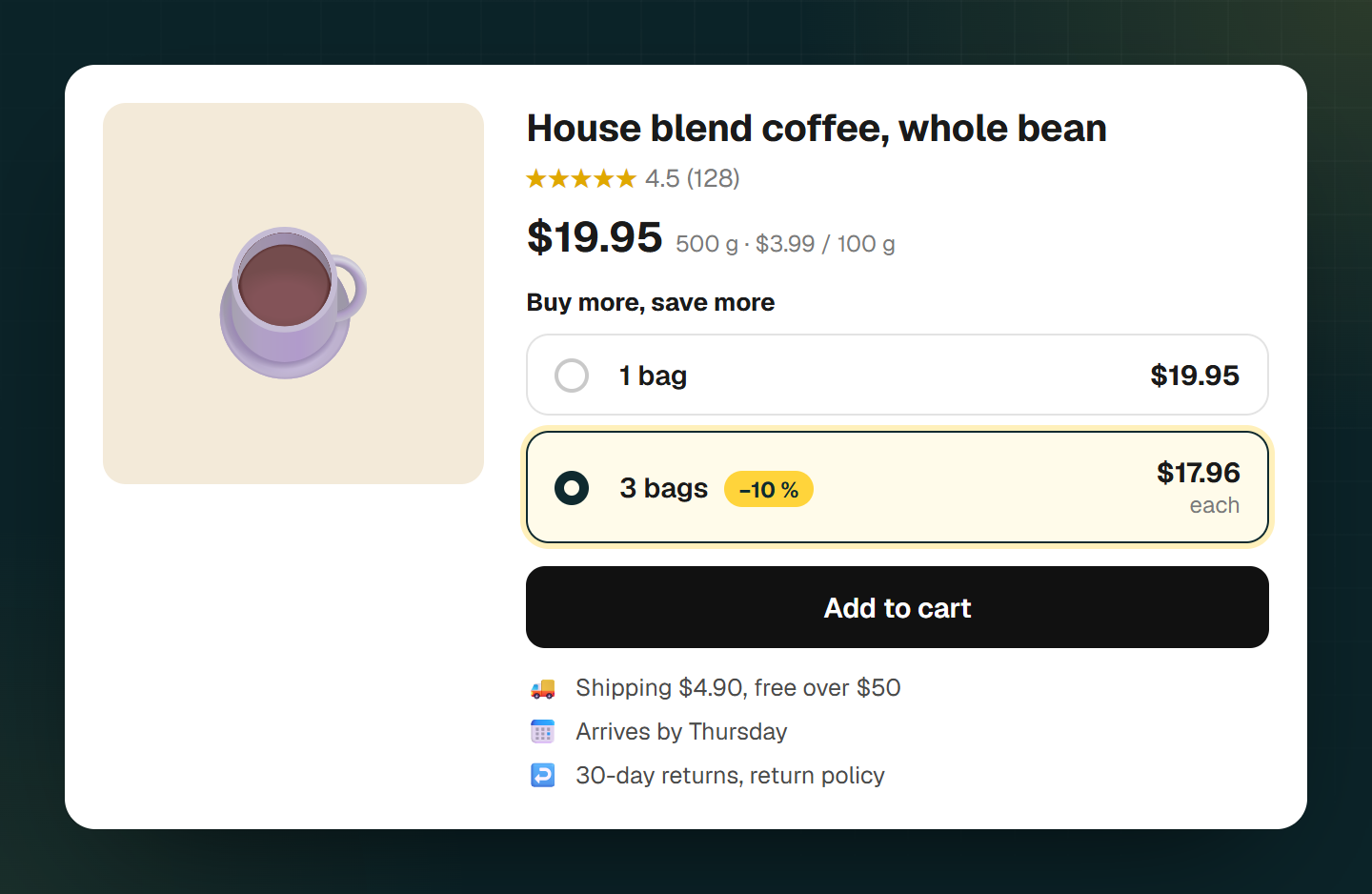
3 Show tiers with the price per unit next to the price
If three units are cheaper, say so where the price is. Baymard's 2026 benchmark: 81% of stores show no price per unit for items sold in varying quantities. In testing, users then had to do the math themselves and didn't always get it right.
Show the saving as an amount and as a percentage, and describe the offer once, not three times. 19% of desktop stores repeated the same offer in several places.

4 State shipping costs and delivery date by the buy button
In a Baymard study, 64% of users looked for shipping costs on the product page before adding to cart. 67% of stores show no total cost near the buy button, 41% no delivery date.
Below the price, state what shipping costs (or when it's free) and when the order will arrive.
5 Link your return policy
60% of users look for return information on the product page, according to Baymard, and 44% of stores don't link it there. Among surveyed US shoppers who had abandoned an order in the previous three months, 15% named an unsatisfactory return policy as the reason.
A line like "30-day returns" with a link to your policy is enough.
6 Show reviews, including the bad ones
53% of users specifically look for negative reviews. According to the Spiegel Research Center, purchase likelihood peaks at an average rating between 4.0 and 4.7 stars, so a store with only five-star reviews tends to look suspicious rather than convincing.
Reply publicly to criticism, which 89% of stores don't. To show reviews in your own store you need an app, because Shopify shows Shop app reviews only in the Shop app.
7 For your own brand: show outside proof
Many Shopify stores sell their own brand directly. That's exactly where users trust in-store reviews less: 62% of users looked for reviews on other sites before buying from an unfamiliar brand, according to Baymard.
Link independent review platforms or press coverage if you have any.
8 Check the page on a phone
On a phone, can you see the price, the variant choice, the shipping note and the buy button without hunting? Sizes and colors as buttons instead of a dropdown help; 57% of stores still use dropdowns for sizes, according to Baymard.
Sources
- Baymard Institute: Current State of Product Page UX (2026)(opens in a new tab)
- Baymard Institute: Image Resolution and Zoom (2020)(opens in a new tab)
- Shopify Help Center: Product media(opens in a new tab)
- Baymard Institute: Product Page Price Discounts (2022)(opens in a new tab)
- Shopify Help Center: Unit pricing(opens in a new tab)
- Baymard Institute: Price per Unit (2023)(opens in a new tab)
- Shopify Help Center: B2B quantity price breaks(opens in a new tab)
- Baymard Institute: Show Shipping Costs on Product Pages (2017)(opens in a new tab)
- Baymard Institute: Shipping Speed vs Delivery Date (2023)(opens in a new tab)
- Baymard Institute: Respond to Negative User Reviews (2019)(opens in a new tab)
- Spiegel Research Center: How Online Reviews Influence Sales(opens in a new tab)
- Shopify Help Center: Product reviews in the Shop app(opens in a new tab)
- Baymard Institute: User Reviews on DTC Sites (2022)(opens in a new tab)
Common questions
Does Shopify show product reviews in the store without an app?
What image size is best for Shopify product images?
Should a product page show the price per unit?
Related reads
Improve your conversion rate
Where your store loses buyers, what speed, trust and visible savings do: eight steps with evidence.
Read moreMultiple quantity breaks don't fit in one discount
In Shopify's discount form you pick one minimum purchase requirement with one value, which means one threshold per discount. For 10% off 5 or more items and 15% off 10 or more, you need two separate automatic discounts natively, or an app that keeps every tier in one discount.
Read morePrice psychology in online stores
What studies on charm prices, anchors, the free effect and goal proximity show, and how to use them fairly.
Read more