Checkout guide
Pay by invoice and net terms for repeat customers only
Letting customers pay later is a strong offer. It also means you ship before you're paid. For a customer who has paid you three times, that's a small risk. For a stranger with a $2,000 cart, it isn't. Here's how to show pay by invoice in Shopify only to the customers you know.

1 Why not offer terms to everyone
Selling on credit is everyday business between companies. In a 2026 survey of more than 600 businesses in the US, Canada and Mexico, Atradius found that 43% of sales were made on credit terms, and seven in ten companies were affected by late payments.
When you send the invoice yourself, the risk is yours. A customer who has paid you before has shown that they pay. A first-time buyer hasn't. That's why the line sits close: invoice from the second order on.
2 Set up invoice or net terms as a payment method
Business customers have a route of their own. With Shopify B2B a company gets payment terms, according to Shopify on every plan from Basic up. You set them per company location: net 7, 15, 30, 45, 60 or 90, or due on fulfillment. More in the guide to Shopify B2B pricing.
For everyone else, you create a manual payment method. The order stays unpaid until you mark it as paid, and the risk of non-payment is yours. Cash on delivery (COD) works the same way and carries the same risk when a parcel comes back.
Here's how to set up a manual method:
- In your Shopify admin, open Settings > Payments.
- Under Manual payment methods, select Create custom payment method and give it a clear name, such as "Pay by invoice (net 30)".
- Under Payment instructions, say how and by when the customer pays. They appear on the order confirmation page.
- Click Activate. From now on every shopper sees the method, until a rule limits it.
3 The rule: hide the invoice while someone is new
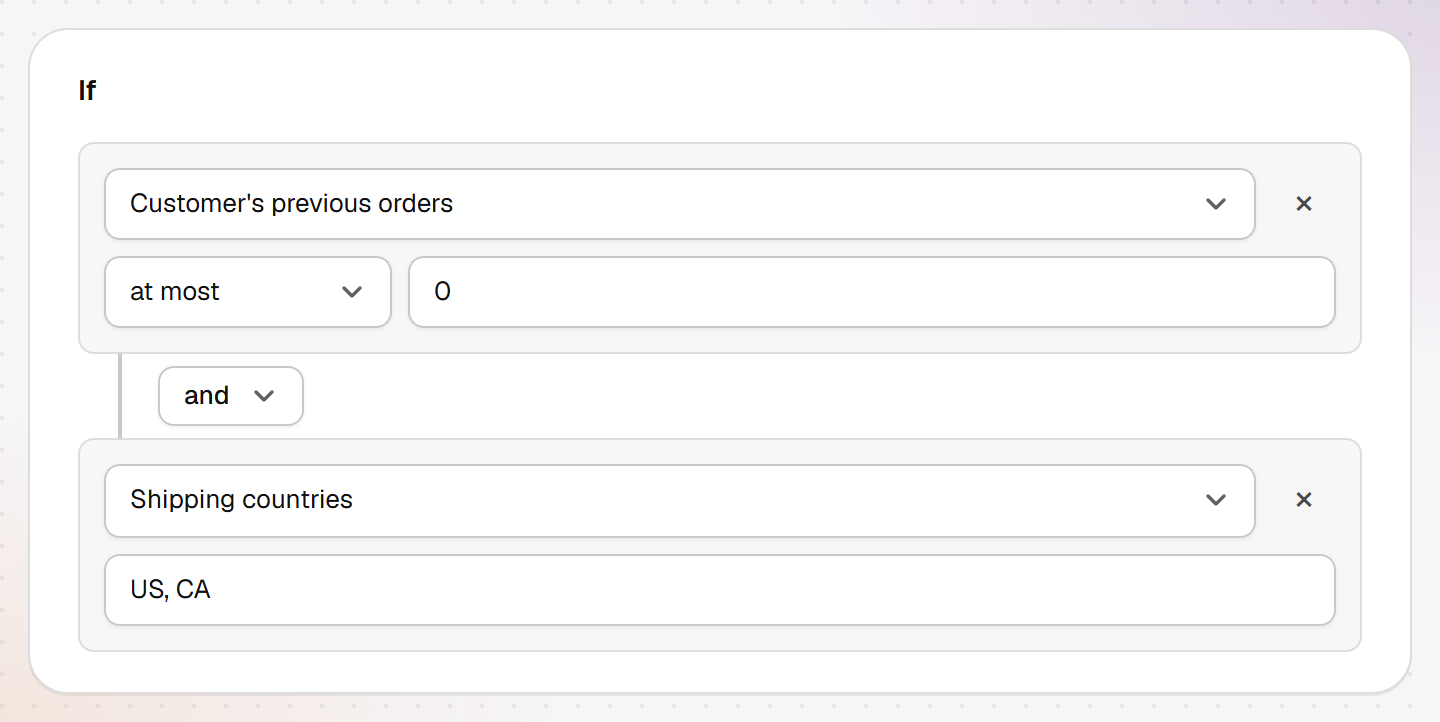
The rule hides the invoice for new customers and leaves it for everyone else. Under "Then" choose "Hide payment method" with "Name contains invoice". Under "If" add "Customer's previous orders at most 0".
Anyone who has ordered before sees the invoice. To show it from the third order on, use "at most 1". Instead of the number of orders you can use the amount: "Customer's spend so far at most $500".
With "or" you add more reasons, for example "or Cart value at least $2,000". Then even a regular customer doesn't get terms on an unusually large order. With "and" you narrow the rule down, for example to certain shipping countries.
4 Guests count as new customers
Shopify only tells a rule at checkout who the customer is when they're signed in to their customer account. Entering an email in guest checkout isn't enough, as a Shopify staff member confirmed in the developer forum. Hand-E Checkout Rules therefore treats a guest as a new customer: 0 orders, $0 spent, no tags.
For invoices that's the safe direction. A stranger doesn't see the option. A regular customer checking out as a guest doesn't either, until they sign in. With Shopify's new customer accounts that takes no password, just a six-digit code by email.
So say it where you list your payment methods: "Pay by invoice is available from your second order when you're signed in to your account."
For orders by phone or email, create a draft order for the customer and send them the checkout link. According to Shopify, payment rules run in a draft order's checkout too, and in our test that checkout knew the customer without a sign-in.

5 Keep late payers out with a customer tag
The condition counts orders. It doesn't check whether the invoice for them was paid. So tag late payers, for example "no-terms", and add "or Customer tags no-terms" to the rule.
You add tags on the customer's page, on desktop also for many customers at once. Shopify allows up to 250 tags per customer. A tag only reaches signed-in customers, guests don't carry tags. The first condition already covers them, because every guest counts as new.
Shopify Flow can set the tag for you. According to Shopify, Flow is free on Basic, Grow, Advanced and Plus. A workflow could look like this:
- Trigger: Order created.
- Condition: the order was placed with your invoice method.
- Wait, for example 45 days. After a wait, Flow refreshes the order data, according to Shopify.
- Condition: the order still isn't paid.
- Action: Add customer tags, "no-terms".
6 Be clear about who can pay later
Tell shoppers up front who can pay by invoice, on your payment or FAQ page. Otherwise a first-time buyer goes looking at checkout for terms you advertised and doesn't find them.
The same rule works for cash on delivery: hide COD while a customer has no previous orders, and for carts above a value you choose.
The rules above only use data from your store: orders, spend and tags. If you extend credit to consumers or check credit with a bureau, legal rules may apply depending on where you and your customers are. This is not legal advice; have your terms checked if in doubt.
Sources
- Atradius Payment Practices Barometer North America 2026, press release (September 16, 2026)(opens in a new tab)
- Shopify Help Center: Manual payment methods(opens in a new tab)
- Shopify Help Center: B2B plan features(opens in a new tab)
- Shopify Help Center: B2B payment terms(opens in a new tab)
- Shopify Developer Community: Customer GIDs in webhook payloads for guest checkouts (June 2, 2026)(opens in a new tab)
- Shopify Help Center: New customer accounts(opens in a new tab)
- Shopify Developers: Payment Customization Function API(opens in a new tab)
- Shopify Help Center: Shopify Flow(opens in a new tab)
- Shopify Help Center: Flow action Add customer tags(opens in a new tab)
- Shopify Help Center: Flow action Wait(opens in a new tab)
- Shopify Help Center: Using tags(opens in a new tab)
Common questions
Does a repeat customer see the invoice option when checking out as a guest?
Can I offer net terms only from the third order on?
Do I need Shopify Plus for B2B payment terms?
Does the rule work with a pay-later provider?
Related reads
Hide payment methods in Shopify
COD only at home, no PayPal above a set cart value, the cheapest method first: what works without an app, without Plus, and where rules stop.
Read moreWin back existing customers
Measure the gap between orders, use segments, time win-back emails, and use codes that don't end up on coupon sites.
Read moreBusiness customers need other price breaks than shoppers
Shopify's B2B volume pricing gives business customers fixed unit prices above a certain quantity, counted per variant. According to the changelog, it runs on Basic, Grow and Advanced since April 2026. Volume tiers from Hand-E AI Discounts give shoppers in your online store a percentage or fixed amount off. They can also count variants together.
Read more