Checkout guide
How to set a minimum order value in Shopify, without Plus
A $20 order can cost you money: the box, shipping and the payment fee come with every order, however small. Shopify has no setting for a minimum order value. This guide covers when a minimum pays off, which workarounds exist, and how to announce it so nobody hits a wall at checkout.

1 What a minimum order value is, and when it pays off
A minimum order value is the amount the items in the cart must reach before an order can be placed. If the cart is below it, the shopper can only check out after adding something.
It pays off when every order brings fixed costs that a small cart can't carry: packaging, shipping, the payment fee and the time it takes to pack. In wholesale it's common, because a delivery to a reseller only pays off above a certain volume.
- Cheap items where shipping costs almost as much as the product
- Heavy, bulky or chilled goods with high costs per parcel
- Wholesale buyers and resellers who should order in larger quantities
2 Work out what a small order costs you
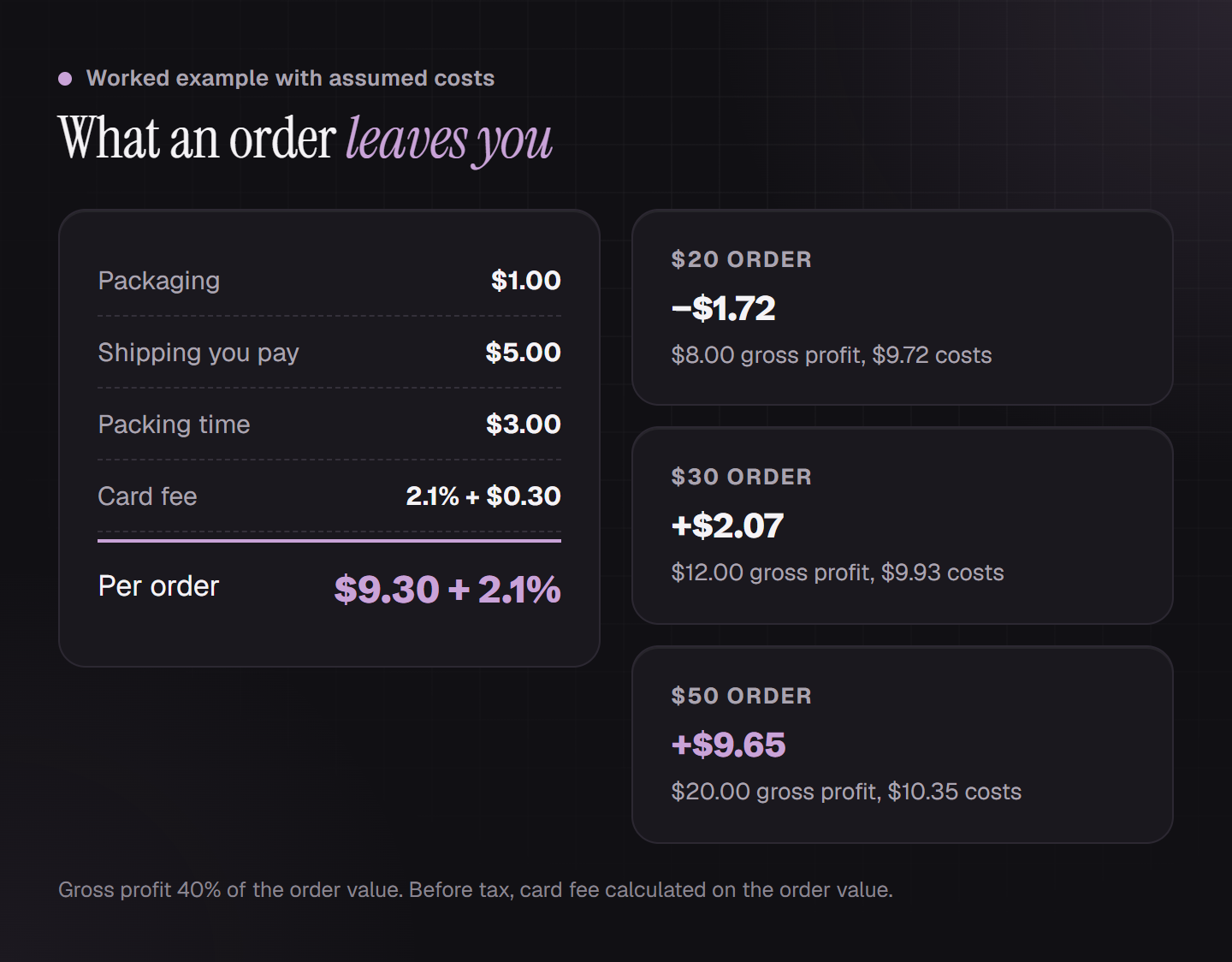
An example with round assumptions. You keep 40% of the order value as gross profit, after the cost of the goods. Every order costs you $1.00 for packaging, $5.00 for shipping you don't pass on, and $3.00 for packing time. On top comes a card fee, here 2.1% plus $0.30. Together that's $9.30 plus 2.1% per order. To keep it simple, everything is before tax and the fee is calculated on the order value.
A $20 order leaves you $8.00 of gross profit, but the order costs $9.72. You lose $1.72. A $30 order brings $12.00 of gross profit against $9.93 of costs, so $2.07 is left. A $50 order brings $20.00 against $10.35, so $9.65 is left. The point where an order stops costing you money is around $24.50 here.
So why $50 and not $25? An order at break-even earns nothing, and returns, breakage and support questions still come on top. Where you set the line is a trade-off between profit per order and the number of orders. Use your own costs, not these.
3 Minimum order value or free shipping threshold?
Both put a line at a cart value, but they work in opposite directions. A free shipping threshold rewards: whoever reaches $50 saves on shipping, and whoever stays below still orders. A minimum order value blocks: whoever stays below can't order at all.
The reward is the friendlier choice, but not automatically the cheaper one. In a study using data from an online retailer, shoppers were very sensitive to shipping fees, and free shipping above a threshold brought in clearly more sales. It still didn't pay off for the retailer, because the shipping revenue was gone. How many shoppers walk away at a minimum order value depends on what you sell. We haven't found a reliable figure for it.
You can combine the two: a low minimum against loss-making orders, and a free shipping threshold above it. How to get shoppers over a threshold is covered in a separate guide.
| Feature | Minimum order value | Free shipping threshold |
|---|---|---|
| Below the line | no order possible | order with shipping fee |
| Effect | protects against loss-making orders | nudges shoppers to add more |
| Risk | shoppers walk away | you pay for shipping |
| In Shopify | workaround or app | built in, through shipping rates |
4 What Shopify can do without an app
Shopify says so itself: to validate a cart or checkout, you need an app that supports cart and checkout validation. Without one, there are two workarounds, plus a third route if you have a developer. Each has a limit.
Shipping rates by order value. You start your lowest rate at $50. If an order falls outside all your tiers, Shopify says no rate applies and the customer receives a shipping error at checkout. That stops the small order but doesn't explain why. For products without shipping, such as digital goods, the workaround doesn't apply.
B2B quantity rules. For company customers you set a minimum, a maximum and an increment per variant. That's Shopify's built-in minimum order quantity per product, for B2B only. According to Shopify, B2B is available on the Basic, Grow, Advanced and Plus plans. The rules apply to B2B orders, and Shopify's overview of B2B features lists no minimum value for the whole order.
Your own app. Checkout validation runs on Shopify Functions. You can use a public app with functions from the Basic plan up; a custom app with functions only works on Shopify Plus.
| Route | What it does | Where it stops |
|---|---|---|
| Shipping rates by order value | stops small orders | the shopper only sees a shipping error |
| B2B quantity rules | minimum quantity per variant | B2B only, no minimum order value |
| Minimum purchase on a discount | discount from an amount | applies to the discount, not the order |
| Custom app with functions | any checkout validation | Shopify Plus only |
| Public app with functions | block with your own message | from the Basic plan |
5 How to set up the block in Hand-E Checkout Rules
In the app, a minimum order value is a checkout block with one condition. It counts the sum of the items, without shipping. If that's below your line, your sentence shows at the top of checkout and the order can't be completed. The shopper can still change the cart, because the block only applies at checkout, not on every cart change.

- Create a new checkout block. The first condition is already there: cart value at most.
- Enter an amount just below your line, so 49.99 for $50. Orders up to $49.99 are then blocked, and from $50.00 they go through.
- Write the sentence your shopper reads at checkout, for example “Orders are possible from $50.” It can be up to 250 characters long.
- Save the rule. The app won't accept a block without a condition, because it would block every checkout.
6 Announce the minimum before anyone reaches checkout
The block only speaks up at checkout. A shopper who reads about $50 there for the first time has already decided to buy, and feels stopped. In Baymard's research, one reason shoppers give for abandoning is that they couldn't see the total cost up front. A minimum that only appears at checkout is the same kind of surprise.
So put it where the decision is made. Before checkout the block shows nothing, so you add the notice to your theme yourself. More on what keeps shoppers in the cart is in a separate guide.
- In the announcement bar at the top of your store, such as “Orders from $50”
- In the cart, right above the checkout button
- On your shipping and payment page and in your FAQ
- In the block's own sentence: say what to do, such as “Orders are possible from $50. Just add a little more.”
7 Who the minimum applies to, and where it doesn't
A second condition joined with “and” narrows the block. “Cart value at most 49.99 and Shipping countries AT, CH” is a minimum for shipping abroad only. With “and Customer is logged in: no” it only applies to guests, with “and Customer tags: Wholesale” only to logged-in wholesale customers. There is no “everyone except” list: you name who the block applies to.
When in doubt, the app doesn't block. A block with a shipping country only applies once a shipping address is entered. If the check runs into a technical error, the order goes through instead of breaking your checkout. If you sell in several currencies, the app converts the cart into your store currency.
- A discount on the whole order doesn't lower the value the block checks. Shopify passes it on before taxes and cart-level discounts.
- Draft orders: according to Shopify, checkout rules apply there too, but you can override them for a draft.
- Shopify doesn't run the check in Point of Sale, on recurring subscription orders or on order edits.
- Shopify explicitly includes express checkouts such as Shop Pay, PayPal, Apple Pay and Google Pay. Still, try it once with an express button before you rely on it.
- The app can't set a minimum quantity per product. “Number of items” counts the whole cart.
- You write the sentence in one language. If you also sell in German or another language, write it in both.
Sources
- Shopify Help Center: Customizing payment methods and delivery options at checkout (validation, draft orders, plans)(opens in a new tab)
- Shopify Help Center: Setting up shipping rates (order amount-based rates)(opens in a new tab)
- Shopify Help Center: Shopify B2B features by plan(opens in a new tab)
- Shopify Help Center: Setting up quantity rules and volume pricing in B2B(opens in a new tab)
- Shopify Help Center: Amount off discounts (minimum purchase requirements)(opens in a new tab)
- Shopify Developers: Shopify Functions, availability by plan(opens in a new tab)
- Shopify Developers: Cart and Checkout Validation Function API(opens in a new tab)
- Shopify: Pricing and fees (Shopify Payments)(opens in a new tab)
- Lewis, Singh, Fay: An Empirical Study of the Impact of Nonlinear Shipping and Handling Fees on Purchase Incidence and Expenditure Decisions, Marketing Science 25(1), 2006(opens in a new tab)
- Baymard Institute: Cart Abandonment Rate(opens in a new tab)
Common questions
What does minimum order value mean?
Can I set a minimum order value in Shopify without an app?
Can I set a minimum order quantity per product in Shopify?
Does shipping count toward the minimum order value?
Related reads
Increase average order value
Thresholds from your own order data, visible tiers, relevant add-ons: eight levers with evidence.
Read moreBusiness customers need other price breaks than shoppers
Shopify's B2B volume pricing gives business customers fixed unit prices above a certain quantity, counted per variant. According to the changelog, it runs on Basic, Grow and Advanced since April 2026. Volume tiers from Hand-E AI Discounts give shoppers in your online store a percentage or fixed amount off. They can also count variants together.
Read moreHide payment methods in Shopify
COD only at home, no PayPal above a set cart value, the cheapest method first: what works without an app, without Plus, and where rules stop.
Read more